Military
War Room and Land War status
Understand the strategic foundations and which war actions remain unfinished.
Reviewed
Administrator-only declarations; staging dispatch, arrival alerts and AI battle entry implemented locally. Compatible rollout and world configuration required; strategic settlement remains unfinished.
What the War Room shows
In Active Wars, select a defender's name to open the World Map centered on one of that opponent's zones. If the destination is not already known, the War Room locates it when you select the name. A message explains if the opponent owns no zones in the current world or if you need to retry.
Open Forces → War Room when your permissions allow it. The page provides the strategic workspace for conflict information and future operations. Its summary can show cash, the current AI declaration cost, eligible PvE targets and active AI wars.
Current limits
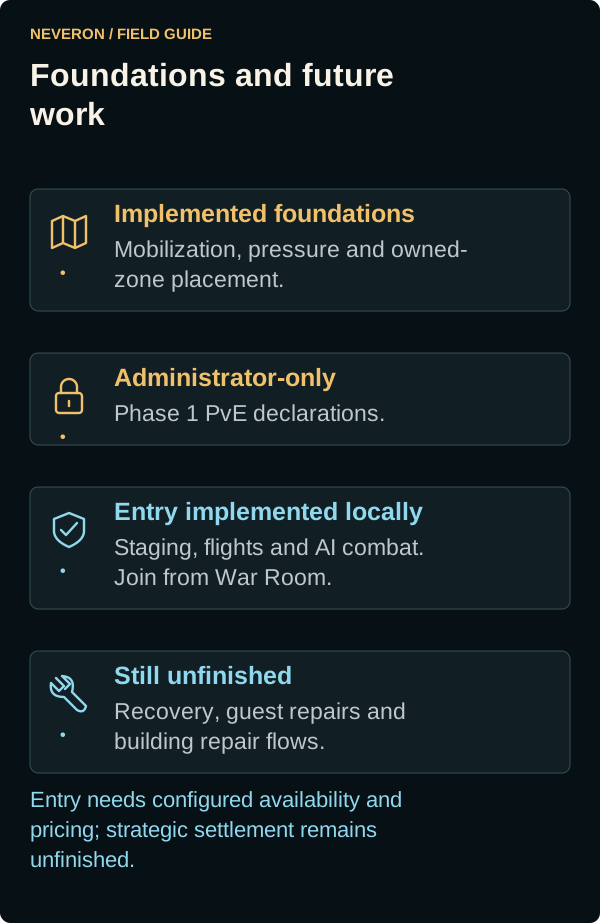
Phase 1 AI declarations remain restricted to administrators until that policy is explicitly changed. Attack setup and initial ground/air entry are implemented locally, but entry depends on the world's configured availability, limits and pricing. The complete strategic outcome and recovery journey is unfinished, so a visible conflict record does not establish a playable Land War release.
Mobilization, pressure estimates, owned-zone relocation and placement foundations exist separately. Use the actual available controls and read their cost and readiness effects.
Attack setup and deployment
With combat permission, select a zone belonging to an AI empire with an active war on the World Map, then choose Attack zone. This opens Select attack units. If you own no adjacent staging zone, the attack is air-drop-only and only eligible jump-capable BattleMechs appear, including unmobilised units.
Search by Unit name or design, or filter by Unit formation to find members of a lance, company, battalion or regiment. Check individual units or use Select / unselect all. Formation filters include eligible members only. You can select units across several zones without mobilising them. The Staging zone selector chooses a destination and does not filter the roster. Choose an owned zone to gather your selected units there using normal transport and its charges. Leave it at No staging zone (direct air drop) to send jump-capable units from their current zones; they join the battle as their transports arrive. Name and formation filters preserve your selections.
Use Select / unselect all above the roster to toggle the currently selectable filtered units. A partial mark means some are selected. Unchecking preserves selections hidden by your filters and does not demobilise units. The checkbox stays available when the filtered units span multiple zones and changes selection only.
Each unit is marked Mobilised or Unmobilised. Selection alone does not mobilise it. Launch attack confirms mobilisation, upkeep and the demobilisation cooldown for selected unmobilised units. Deselecting or leaving does not demobilise them. Military permission is required for mobilisation and staging, in addition to Combat permission.
With a Staging zone selected, Launch attack asks you to Deploy force. This orders gathering and the onward attack, including normal transport and air-drop charges, automatically assigned private landing positions and permanent combat damage. After the complete force reaches staging, it departs for the target automatically. Units already at staging also depart under this order. You may leave the page or disconnect; the order continues. Cancelling the confirmation preserves your selection and sends no order.
For air drops, choose an Air-drop landing sector in the panel to the right of Attack force (below it on narrower screens). The nine choices divide the battlefield into a 3-by-3 grid; Centre is selected by default. The server picks one random centre in that sector, then a random direction and distance from it for each unit. Invalid or already assigned hexes are retried. You choose the sector, not individual landing hexes; staging orders keep your sector choice until departure. If the sector lacks enough suitable hexes, choose another sector or fewer units. A failed landing can scatter outside the sector.
Without a staging zone, Launch attack loads the required setup and opens the launch dialog after any mobilisation confirmation. Review the force and cost, then confirm the launch. There is no separate battlefield setup step for air drops. Landing positions are assigned automatically when you launch. Units depart from their current zones and arrive individually during combat.
If some units cannot mobilise, the page reports their rejection and keeps your selection for review instead of advancing. An unconfirmed response offers an explicit retry to check their current state. If mobilisation changes after loading the battlefield, use Continue to battlefield before launching. If mobilisation succeeds but the map cannot load, the units remain mobilised; Launch attack retries setup without repeating the mobilisation confirmation.
Ground setup uses the actual target terrain and buildings; defender positions remain hidden. Units that are no longer eligible are removed from the selection. If loading fails, use Retry map. Change force returns to unit selection.
If unit or battlefield loading does not respond within 20 seconds, the page offers Retry units or Retry map. Check your connection and select Retry; the page does not retry automatically. A map-loading failure keeps your selected units.
An adjacent staging zone uses ground entry with positions in the five-hex approach band. Automatic staging orders load the target map and assign deployment positions before departure. Other staging zones use air transport with the normal route and pickup timing. Air entry currently requires jump-capable BattleMechs, an automatically assigned landing hex for each unit and an earliest public arrival turn, initially Turn 1. For direct air drops, each unit lands at the end of the first Movement Phase at or after that turn once its own transport has arrived; nearer units do not wait for farther ones. Disposable drop equipment and dropchutes will be added later.
The selection summary shows the charge and whether entry is enabled. Ground entry has no additional operation fee. Air entry costs $100 per ton in addition to the normal per-unit air transport charge. For example, a 2,540-ton force adds $254,000 to its ordinary transport fees. World availability and force limits still apply. Launch commits the force; combat entry requires a desktop or landscape tablet.
Arrival alerts and active battles
After a saved battle resumes, AI uses the restored forces immediately, including infantry already aboard carriers. The recovery correction requires the updated battle server.
Every unit has the full shared 90-second Fire phase to submit its attacks, regardless of how many units you control. All Done can end the phase early once both sides finish. The 90-second duration requires the updated battle server. During Fire, each unit button shows that same full allowance; the phase clock shows elapsed time. Movement deadlines apply only during Move. The corrected button labels require the updated client.
When you submit weapon fire, the server checks your selected targets and available allied spotters, then saves the accepted orders before confirming them. The faster Land War fire handling requires the updated battle server; normal visibility and indirect-fire rules still apply.
Your landed units use black silhouettes, including those controlled by AI. The coloured background shows weight class. The first-arrival colour correction requires the updated client.
Movement options stay open during updates to the same Move phase, including changes to unrelated enemy contacts. The plotted path is preserved while you choose your move. A change to the phase type closes the movement popup. This correction requires the updated client.
The arrival alert offers Join battle when you are elsewhere. It is suppressed while you are already playing that battle, and entering the battle dismisses its pending arrival prompt. Alerts for other battles remain available. This behavior requires the updated client.
Sightings update as units move. An enemy stays identified while at least one eligible ally can see it; losing the last observer can reduce it to a sensor contact or hide it. Moving a jammer, changing terrain or losing a spotter can also change contacts for units that have not moved.
Land War visual range is 30 hexes, with clear or partial line of sight required. Your human-controlled and AI-controlled units share sightings. Beyond visual range, sensors may show an unidentified contact; enemies outside both visual and sensor detection disappear. Woods, elevation and buildings can block sight within 30 hexes. The terrain map and your own units remain visible. This correction requires the updated battle server.
Your landed force remains visible as combat advances into firing, including large deployments. The large-force visibility correction requires the updated battle server. If an older session has already cleared the battlefield view, rejoin the existing battle after the update; starting a replacement deployment is unnecessary.
Land War battles have no overall time limit. The battle view shows No time limit; Movement and Fire phase timers still run normally. This behavior requires the compatible battle server and client update.
After landing, your units appear in your force even while AI controls them. Select a unit to centre it on the map. Use its AI control toggle to take human control, subject to the normal control limit; units controlled by another player cannot be claimed. Detected enemies appear in Enemy Targets and on the map, and disappear when contact is lost. The correction for units arriving after you joined requires the updated client; reload and rejoin the existing battle after that update.
Air-dropped units do not appear on the map immediately when you enter combat. They land at the end of Movement on their scheduled turn, normally Turn 1 for the initial deployment, once their transport has arrived. Before your first landing, your force list can be empty and fog of war can hide all enemy units. A unit that lands in Turn 1 can move and attack from Turn 2. Arrival turns are automatic; there is no arrival-turn selector. Existing committed deployments keep their recorded schedule. The incoming-force notice shows how many ’Mechs are waiting and their earliest landing turns, then clears after the last landing. This notice requires the compatible battle server and client update.
The Military roster's Transit column identifies the units assigned to a deployment: In flight with destination and ETA during transport, then In battle. Mobilisation alone does not mean a unit is assigned to an attack. These roster labels require the compatible client and server update.
For a force travelling from a staging zone, Enter battle stays disabled until the displayed transport arrival time, then becomes available automatically. You still choose when to enter. Direct air drops may allow entry while individual units are still travelling. If entry fails, one message explains the problem; retry after resolving it.
Land War uses three battle tabs: Player Units, Enemy Targets and Full Log. Player Units lists your force above the selected unit details. Use a unit's ID button to take control from AI or hand it back; another commander's units cannot be taken over. Enemy Targets lists detected opponents. This layout requires the updated client; reload and rejoin an existing battle to apply it.
Battle chat has one Allied forces channel. In the current PvE flow, it is shared by your empire's owner and delegates with Combat permission. Opponents and spectators cannot read or post there; faction membership alone does not grant entry. The input stays disabled while the channel opens. Leaving battle restores your normal chat tabs and does not delete your allies' conversation.
If Enter battle reports that the committed battle could not be opened and the force remains reserved, keep the existing deployment. Once the service issue is resolved, retry Enter battle for that deployment; reopening it does not charge another launch fee.
If War Room reports a loading error, reopen the page to retry. A display error does not cancel your deployment or battle; check its current status before submitting another attack.
Defenders with no saved starting position use the same clustered spread as air drops: one random centre in the middle area, then a random direction and distance from that centre for each unit. Invalid or already occupied hexes are retried. The area expands only when terrain or force size leaves too few legal positions. Saved positions take priority; blocked or invalid positions use nearby available hexes. These deployment rules apply to newly started battles after the server update.
The defending force can include BattleMechs, vehicles and infantry. The jump-capability requirement applies to attacking air-drop units. The initial limits allow up to 50 attackers and, by default, 100 defenders, subject to the world's configured limits. A larger garrison blocks launch rather than leaving defenders out of the battle. Units with damage that cannot yet be loaded also block launch.
The War Room lists Active battles and deployments: gathering forces, flights and their arrival times, active battles, and blocked orders with their reason. On arrival at the target, combat starts automatically and a message offers Join battle. With direct air drops, the arrival message appears when the first transport reaches the target. AI controls unattended units until you join; leaving hands control back to AI. Normal player control limits still apply.
Use Join battle in the arrival message or War Room to enter or reconnect. An expired message does not remove the battle from War Room. Opening War Room after returning shows its current state. If a deployment is blocked, cancel it there and submit a corrected order. Cancelling an onward order does not stop or refund ordinary staging transport already underway. A committed operation can only be cancelled before battle startup; its launch refund is separate from staging travel charges.
If a manual launch reply is interrupted, use Recover launch response. Automatic orders recover interrupted launches without a second charge. Earlier staging-only movements did not retain an attack target: select those units and confirm a new deployment once after the update.
After the mixed-defender update, deployments blocked by the old BattleMech-only error resume automatically from staging. You do not need to submit another attack for that order. Other blocked orders still require the correction shown in War Room.
Air-drop landing rules
Landing hexes remain private until resolution after ordinary movement, once both the scheduled arrival turn and the transport arrival time have been reached. A landing Piloting Skill Roll determines success. A landed unit cannot move or attack that turn; attacks against it receive a +3 target movement modifier. It can act normally next turn.
On failure, scatter is one D6 hexes per point by which the roll missed, in one random direction, followed by a fall of that height. Failure by eight or more, or leaving the map, destroys the unit for the battle. Successful occupied-hex landings use displacement; failed landings use accidental falling-from-above rules.
With the updated battle service, the battle log records the landing roll and target, failure margin, scatter distance and direction, nominated and scattered hexes, and fall height. The unit appears in its scattered landing hex. A later fall injury piloting check tests injury to the pilot; it is not another landing roll. The fall entry shows the height and total damage before the individual damage packets.
The current implementation ends at a recorded battle result awaiting strategic settlement. It does not yet provide a complete playable occupation, withdrawal or recovery loop. Follow the availability message rather than treating these entry controls as a released war system.
With the updated battle service, finished battles discard their saved simulation and recovery checkpoints. The battle result and final unit conditions are retained, and cleanup does not heal units or erase permanent damage. A result awaiting settlement still needs the remaining strategic settlement work; cleanup alone does not return units to duty.
Repair and logistics boundaries
Owned BattleMech Repair Bays have their own implemented facility and repair systems. Live strategic damage handoff, salvage and recovery, faction guest logistics and damaged-building engineering repairs still need their remaining integrations.
The full Repair Bays illustrated guide explains the intended repair journey, but its recovery and guest-service sections must not be treated as presently available transport.
Follow implementation progress
The wiki's Feature status link shows reviewed implementation and availability notes. Completion of documentation or a planning interface does not activate the corresponding gameplay.