Military
Pilot rehabilitation
Assign injured pilots to available treatment and understand shared-centre travel.
Reviewed
Automatic background page updates require the next compatible game update; reopening the page still loads its current state. Available treatment depends on your empire, permissions and centers. Corrections for natural and instant-healing returns await the next game update, including fully healed units with retained assignments. Historical lost assignments are not restored. Reviewed crew actions, roster BV/zone controls and recovery estimates are implemented locally for the next compatible game update; world-specific crew actions require enablement.
Inspect injured personnel
Opening Rehabilitation loads the current pilot and centre lists. After the next game update, treatment progress, travel arrivals and shared-centre capacity will update automatically while you play. If a dismissal receives no reply, reopen Rehabilitation to check the current list before trying again.
Open Forces → Rehabilitation. Summary cards show pilots needing healing, free and occupied recovery capacity and usable centres. Compare health separately from Gunnery and Piloting skills before choosing who to treat.
Assign treatment
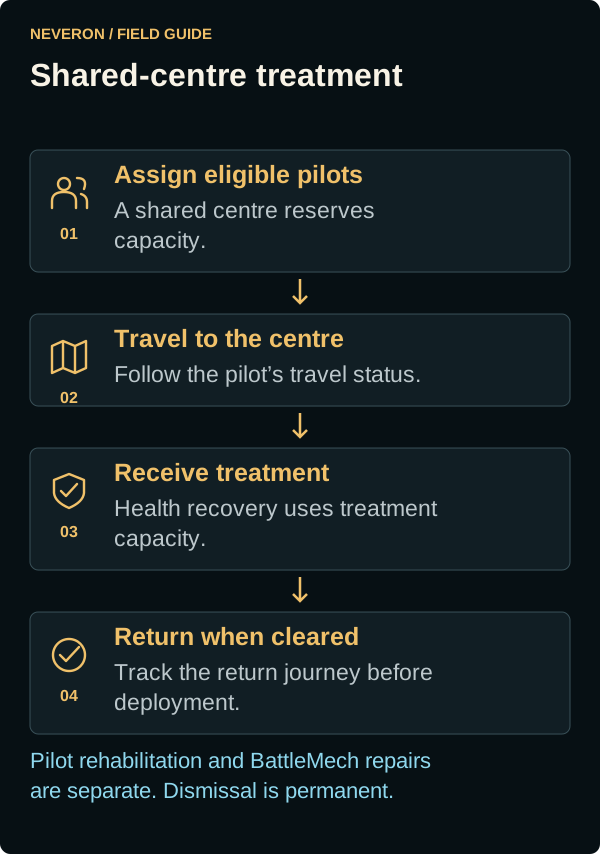
- Select eligible pilots from the list.
- Inspect the available rehabilitation centres and their capacity.
- Use the chosen centre's assignment control and review the result.
- Track the assigned centre and treatment or travel status as recovery proceeds.
Faction-shared centres reserve capacity immediately. Pilots travel out for treatment and return when cleared; access to a shared centre is not instant healing at home. Centre owners control sharing, and available capacity can change.
When treatment finishes
Full health and availability are separate while a unit returns home. After treatment, a unit at a remote centre travels back to its original zone before becoming available. Treatment in its original zone needs no return journey.
A correction for fully healed units remaining in treatment awaits the next game update. It also resumes return travel for affected units whose original assignment remains. If a healthy unit stays stuck after that update, contact support with its unit name and original zone.
Dismissal is permanent
Dismiss permanently removes an eligible pilot or vehicle crew and returns their unit to inventory. It is not a treatment action. Read the confirmation carefully; busy or protected units cannot be dismissed.
Pilots and machines recover separately
Rehabilitation heals surviving personnel. Repair Bays restore eligible BattleMechs and cannot bring back a dead pilot. Check both unit damage and personnel health before treating a force as ready for duty.
Instant pilot healing and return travel
Donation Point pilot healing restores personnel health immediately. The updated treatment handling keeps the assigned return journey: at a remote centre, the unit travels back to its original zone before becoming available. At a centre in its original zone, it becomes available immediately.
If healed on the way to a centre, the pilot finishes that outward journey and then returns. Healing during the return journey leaves the pickup and arrival times unchanged. Check the travel status before trying to use the unit. This return-handling correction awaits the next game update; it does not recover origins lost by earlier healing.
Read recovery estimates
The next compatible game update adds Next health point and Full recovery estimates. They use the current treatment conditions and show real time remaining. Changing treatment or health can change the estimate; a countdown reaching zero does not itself confirm recovery.
Remaining times are rounded to one unit: days, hours or mins. Durations under a minute show <1 min.
Travel is shown separately. While travelling, or when the recovery history or schedule is unavailable, the affected estimate explains why it cannot be shown. The page receives updated health and estimates automatically.